Wednesday, 23 August 2017

SAMSUNG BACK WITH IT's MOST PREMIUM NOTE SERIES...THIS TIME WITH NOTE 8..

How do you recover from one of the most disastrous episodes in consumer electronics history? That’s the challenge Samsung has confronted in the months leading up to today’s announcement of the Galaxy Note 8. Undeterred by the battery catastrophe that led to a complete recall and effective cancellation of the Galaxy Note 7, Samsung just unveiled its successor today.
The Galaxy Note 8 is here, and Samsung is hopeful that consumers who appreciate the Note’s features and its signature stylus will be willing to give the brand another chance after months of hearing warnings aboard airplanes and other public transit about the dangers and potential for destruction posed by the recalled smartphone. The name hasn’t changed. It is a Galaxy Note through and through, and it’s definitely the nicest one Samsung has ever made. Preorders begin tomorrow on all the major US carriers, and an unlocked model will be available at launch for the first time. The Note 8 will be released in stores on September 15th.
amsung’s comeback strategy hasn’t been as flippant as simply moving on and making another phone. In the aftermath of fires, customer injuries, and an avalanche of bad PR, the company has established a multi-point battery safety check, which is being used for the Note 8 just as it was for the Galaxy S8 released earlier this year. So far, the biggest complaints about the S8 have been about Bixby and some displays having a red tint. Batteries haven’t burst into flames or exploded, so the S8 can be considered a successful first half of a rebound. But to truly press on, Samsung needs the Note 8 launch to come and go smoothly — even if it doesn’t break sales records for the line.
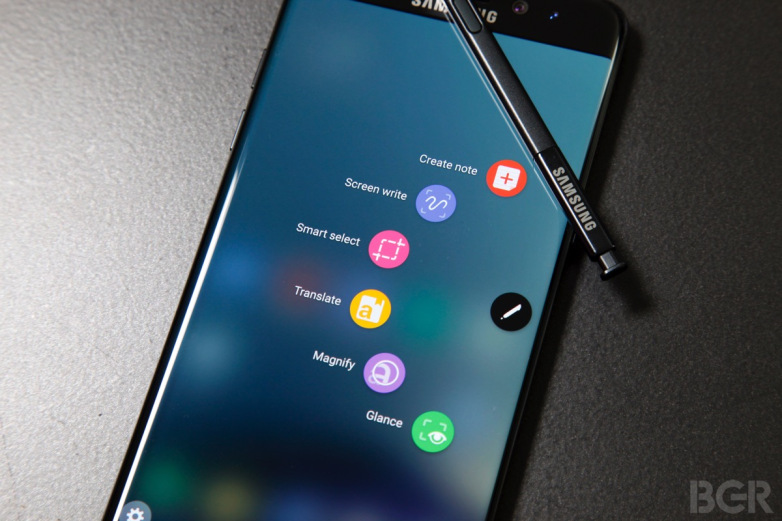
The leaked photos and specs for the Note 8 have been accurate; it leans heavily on the design of the Galaxy S8 Plus, but features a display that’s slightly larger (6.3 inches instead of 6.2 inches), corners that are more squared off, and less curvature to the front side edges. It’s still very much a curved screen, but you’ve got slightly more flat surface area to work with (and write on). The Note 8 is a bit heftier than the S8 Plus at 195 grams (0.43 pounds) versus 173 grams (0.38 pounds), and there was a noticeable in-hand difference to me because of that. Color options include black, gray, gold, and blue, although the latter two won’t be available in the United States. That’s a shame, since the blue was my favorite of the four when previewing the phone.
When talking about the Note 8’s hardware, Samsung makes a strange habit of comparing it to the two-year-old Galaxy Note 5 — as if the Note 7’s recall has fully extinguished it from history. The company says the S Pen has more levels of pressure sensitivity and is water resistant this time around, but those things were also true of the stylus slotted inside last year’s phone. In reality, it’s basically the same S Pen.
The Note itself has seen more worthwhile upgrades, though they’re all very predictable. It’s got a Snapdragon 835 processor, 64GB of storage (with microSD support), and 6GB of RAM. The battery is 3300mAh, so clearly Samsung is playing it safe for at least the Note 7’s direct successor. That bump in RAM — the S8 and S8 Plus have 4GB — and a barely bigger screen are the main hardware differences between the Note 8 and Galaxy S8 when you’re looking at it from the front. It’s incredibly difficult to spot the display size difference with the two phones side by side, but there’s another big differentiator around back: a dual-lens camera.
Samsung has equipped the Note 8 with two 12-megapixel cameras. The regular / wide-angle lens has an aperture of f/1.7, and the telephoto lens is f/2.4. But in what Samsung claims to be an industry first, both sensors offer optical image stabilization. (The iPhone 7 Plus’ zoom lens doesn’t have OIS, but the primary camera does.) That should allow the Note to utilize its telephoto camera more often instead of defaulting to the regular camera in low-light conditions, which is what the iPhone often does.
With a dual camera comes the plethora of new software modes you’d expect. Samsung has its own take on the portrait mode, which blurs the background behind your subject to mimic bokeh. You’re able to dial the effect up or down to your liking instead of being stuck with just on / off modes, which is nice. You also have the option of adding (or removing) it after a shot has already been taken. And a “Dual Capture” mode stitches together photos from both cameras and saves them individually, too. Unfortunately, the Note 8 retains the same awkward position for the fingerprint scanner as the Galaxy S8. It’s a little easier to feel and distinguish from the camera lens, but it’s still a stretch.
The Note 8 ships with Android 7.1.1, and the overall software experience is basically identical to what’s on the Galaxy S8. Bixby has a big presence, and yes, there’s still a dedicated physical button for Samsung’s digital assistant. Samsung is also bringing DeX to the Note, so if you buy the required dock, you can plug it into a monitor for a desktop-like experience with a mouse and keyboard. One new thing is that you can now pair two apps in Apps Edge so that they’ll always launch together in split-screen mode. Other useful, small software features, like the ability to easily create GIFs from videos, are also here. And the overall look, feel, and fluidity remains leaps and bounds better than the old days of bad, ugly Samsung software.

But the S8 Plus is often on sale for under $700, which is easier to swallow than the Note 8’s very premium price tag. If Samsung isn’t as aggressive about marking down the Note’s cost, there will be a wide price gulf between these two phones. And if that’s not enough, Samsung is about to face off against a redesigned iPhone, the Pixel 2 XL, and more.
But the Note is back because Samsung believes there are still consumers who love it. Assuming the company can avoid unforeseen disaster with the Galaxy Note 8, it will have made a triumphant return from one of its most humbling failures.


INTEL BACK IN THE BUSINESS WITH i8 CHIPSET....

Intel has finally shown its hand in the 2017 CPU wars, revealing the processors that’ll power the laptops going on sale before Christmas this year. We still don’t have firm details on the expected ‘Coffee Lake’ desktop chips yet, but this piece will contain everything Intel has officially revealed along with some extra juicy rumours about what’s coming up.
Key points:
  • Intel doubles number of processor cores on laptop chips
  • New chips are response to AMD’s upcoming Ryzen Mobile
  • Revealed laptop chips are 40% more powerful than 7th-gen equivalents and twice as fast as five-year-old equivalents
  • Line-up is mix of different Intel architectures for the first time
  • No information on 8th-gen Coffee Lake desktop processors
Intel’s first drip of information on its new 8th-generation chips will be music to the ears of people looking to buy a laptop before the start of 2018. From 7th-generation ‘Kaby Lake’ to 8th-gen ‘Kaby Lake’ (you read that right, we’ll explain later, we promise), Intel is claiming a “once in a decade” performance boost of 40% generation-over-generation.
When you look at the figures, it’s easy to see why. The first four chips revealed are from the U-series of CORE I chips. These processors are the most common you’ll find in cheaper laptops, as well as ultra-thin and light notebooks.
Where the last-generation equivalents of these new processors were dual-core parts, Intel has doubled the number of cores. Quad-core performance on an Ultrabook? Result! Well, not quite.
Yes, there will be four cores but there’s more to performance than just number of cores.  These are still low-power processors. In other words, these aren’t intended to replace more powerful quad-core laptops using ‘H’-series CPUs. However, what is clear is that new laptops will be much better at handling multiple tasks at the same time (such as loads of browser tabs), and should make many tasks a lot smoother.
Intel says 80 laptops will be available with the new quad-core chips before the end of the year, although how many come to the UK remains to be seen.
i7-8650U
i7-8550U
i5-8350U
i5-8250U
Processor frequency (GHz)
1.9-4.2
1.8-4
1.7-3.6
1.6-3.4
CPU cores/threads
4/8
4/8
4/8
4/8
Cache
8MB
8MB
6MB
6MB
Graphics clock speed (MHz)
Up to 1150
Up to 1150
Up to 1000
Up to 1000
This first tranche of new chips will be running on a refined version of Intel’s previous-generation CPU architecture, called Kaby Lake. While it’s the same underlying technology, this only tells part of the story.
While there are more cores, the base clock speed of each chip is substantially lower than their predecessors. The Core i7-7600U, for example started at 2.8GHz, while the new i7-8650U will run as low as 1.9GHz.

Friday, 18 August 2017

The 7 best Chromebooks of 2017: the top Chromebooks ranked
In case you’ve been living under a rock for the past few years, Chromebooks have shaken up the budget laptop scene. Defined as any laptop toting Google’s lightweight Chrome OS, the best Chromebooks are known for their responsiveness (even on low-end hardware) and interoperability with the cloud.
1. Asus Chromebook Flip
Premium Chromebook specs, economic Chromebook pricing
CPU: Intel Pentium 4405Y – Intel Core m3-6Y30 | Graphics: Intel HD Graphics 515 | RAM: 4GB | Screen: 12.5-inch, FHD (1,920 x 1,080) LED backlit anti-glare | Storage: 32GB – 64GB eMMC
Elegant tablet mode
Tactile keyboard
No out-of-box Android app support
Middling speakers
Before the Asus Chromebook Flip came around, pickings were slim when it came to affordable Chromebooks sporting full-on Intel Core processors and full HD 1080p displays. Touchscreens, backlit keyboards and USB-C ports were also an anomaly. But, of course, the Asus Chromebook Flip brought all of these facets to life. Compared to what’s offered by the competition, the Asus Chromebook Flip’s value is unparalleled, and that’s without getting into its pristine tablet mode, which blows other hybrids completely out of the water 
2. Samsung Chromebook Pro
Cultivating the marriage of Chrome OS and Android
CPU: 0.99Ghz Intel Core m3-6Y30 | Graphics: Intel HD Graphics 515 | RAM: 4GB | Screen: 12.3-inch, QHD (2,400 x 1,600) touchscreen | Storage: 32GB eMMC
Stunning, gorgeous design
Stylus support on Chrome OS
Cramped keyboard
Weak speakers
The Samsung Chromebook Pro is the result of Google’s efforts in converging Android and Chrome OS. With the Google Play Store now supported on every new Chromebook that comes out, it only makes sense to design a Chromebook with a 12.3-inch QHD touchscreen, a 360-degree hinge and stylus support to boot. It may have a keyboard that’s too compressed for comfort, but the Samsung Chromebook Pro more than makes up for it doubling as a tablet that puts most Android slates to shame. It’s even mastered stylus input on the first go, which is more than can be said for even some of the loftier Windows laptops.
3. Dell Chromebook 11
Dell's updated Chromebook is a star in almost every regard
CPU: Intel Celeron N2840 | Graphics: Intel HD Graphics | RAM: 2GB – 4GB | Screen: 11.6-inch, HD (1366 x 768) touchscreen | Storage: 16GB SSD
Rugged design
180-degree barrel hinge
Touchscreen not standard
Small keyboard
On the Dell Chromebook 11, you'll find a 180-degree reinforced hinge, sturdy design, sealed keyboard and trackpad and a punchy typing experience accompanying a perfectly portable package. Not only adequately suited for school and work, the Dell Chromebook 11 even packs a set of loud stereo speakers that light up the room while listening to music or watching videos. Everyone else will appreciate the Dell Chromebook 11’s ability to lay flat using a 180-degree barrel hinge, an effective inclusion for touch-based activities. Don’t worry about dinging it, either. This device remains the most rugged Chromebook on our list.
4. Acer Chromebook 15
The colossus of Chromebooks
CPU: Intel Celeron – Core i5 | Graphics: Intel HD Graphics – HD Graphics 5500 | RAM: 2GB – 4GB | Screen: 15.6-inch, HD (1,366 x 768) – FHD (1,920 x 1,080) | Storage: 16GB – 32GB SSD

Fast processing speed
Long battery life
Very heavy
Awkward keyboard
Rather than “Think Different,” Acer's spin on Apple’s catchphrase would be “Think Bigger.” Unlike most in its class, this Chromebook is blessed with a 15.6-inch Full HD screen made better only by its optional Intel Core i5 processor. You probably won't need all that power on a Chromebook (luckily, there’s a newer, even cheaper model that’s been available since October), but it sure is nice to have the option. When it comes to larger Chromebooks, there isn’t much selection, but Acer has come out with a unique exception to this limited trend. Even if it’s packing a few extra pounds, the Acer Chromebook 15 is ace.
5. Acer Chromebook R11
360-degree flips for days
CPU: Intel Celeron N3150 | Graphics: Intel HD Graphics | RAM: 2GB – 4GB | Screen: 11.6-inch, HD (1,366 x 768) | Storage: 16GB – 32GB SSD
Convertible
Good battery life
HD-only display
Terrible trackpad
The Acer Chromebook R11 won’t be winning any fashion shows any time soon, what with its ordinary plain white plastic chassis, but it’s won our hearts over if only for keeping it classy. What's more, behind that plain shell is a surprisingly fit laptop destined to endure an entire day's work. Among the first Chromebooks to support Android apps by way of the Google Play Store, the Chromebook R11 even pioneered a whole world of additional functionality for Chrome OS. Exhibiting an all-day battery life, top-notch performance and a 360-degree hinge with a touchscreen, the Acer Chromebook R11 is worth writing home about – and it won’t break the bank either, thereby making its flaws that much easier to swallow.
6. HP Chromebook 14
Striking optimal balance between value and design
CPU: Intel Celeron N2840 – N2940 | Graphics: Intel HD Graphics | RAM: 2GB – 4GB | Screen: 14-inch, HD (1,366 x 768) BrightView | Storage: 16GB – 32GB eMMC
Excellent keyboard, trackpad
Crisp, vivid screen
Slower than some rivals
Average battery life
The HP Chromebook 14 is practically the posterchild for Chromebooks. Its rock-bottom starting price and zippy interpretation of Chrome OS only begin to exemplify its utility. While Acer's Chromebook 15 serves up similar components (save for SSD storage rather than eMMC), HPs' 14-incher is a bit more compact and better looking to boot. Embellished with a bright blue finish and a screen devised to surprise, this machine boasts the best value out of every Chromebook you could buy. Albeit average in both battery life and performance, the HP Chromebook 14 remains a sublime offering considering the cost.
7. HP Chromebook 13
Flashy and functional, this Chromebook means business
CPU: Intel Pentium 4405Y – Core m7 | Graphics: Intel HD Graphics 515 | RAM: 4GB – 16GB | Screen: 13.3-inch, FHD (1920 x 1080) – QHD (3,200 x 1,800) | Storage: 32GB eMMC
Ultra-thin and sharp design
High-resolution display is a beauty
Lacks touchscreen
QHD+ display hikes price and lowers battery life
The HP Chromebook 13 goes above and beyond what any of us would expect from a Chromebook. You’re guaranteed at least a 1440p screen, two USB-C ports and, if you're willing to shell out just a bit more cash, you can also snatch yourself an Intel Core-M processor rather than a Pentium. All of this is complemented by incredible style and a metallic design that exudes Pixel influence. Given that Google discontinued its own Chromebook earlier in the year, the HP Chromebook 13 is one of the few remaining alternatives. Though it retails for but a fraction of the price that the Chromebook Pixel did before it, don’t be deceived – the HP Chromebook 13 makes no compromises.

Monday, 14 August 2017

LG Q6 REVIEW...A BEAST IN THIS PRICE RANGE..

PROS;
Ø  Looks like the LG G6
Ø  Feels like it, too
Ø  Seems like awesome value
CONS;
Ø  Lacks fingerprint sensor
Ø  We still don't know the price
INTRODUCTION;
The LG Q6 looks like a cutting-room floor version of the LG G6. It’s different in a few key ways, but looks and acts mostly the same. This makes sense, as it’s the cheaper midrange version of the company’s flagship smartphone.
But don’t let the word 'midrange' phase you, as much of the G6’s visual pizazz has made the transition to the midrange class unfettered. The Q6 features its taller aspect ratio, a nearly bezel-free design, and curved glass around its back that really gives it a good feeling in the hand.
Obviously, the innards have been changed considerably to bring the price down. But this could be one of the best mid-range devices around and an easy recommendation when it releases later this month. 
We’re still testing the Q6 and awaiting official pricing and release date details. You can look forward to our full review going up soon, but until then, let’s take an early look at the Q6.

Design

The LG Q6 is a 5.5-inch ANDROID NOOUGAT-powered device that, as previously mentioned, houses many of the LG G6’s best design tricks.
Its LCD display runs at 2160 x 1080, an odd resolution thanks to LG’s 18:9 aspect ratio that it debuted with the LG G6. This is a step down from the flagship’s 2880 x 1440, but it still looks very crisp and colorful.
This phone is hefty in a way that’s reminiscent of a flagship device. Its brushed metal edges play a big role in that, giving off a high-end look and feel while also packing in the antenna array and the host of usual buttons and features: power and a volume rocker, as well as a headphone port and microUSB charging port.
Making our way around the phone, there are very few areas of compromise to meet a lower price point. The back of the phone, for example, feels like plastic instead of Gorilla Glass. This is par for the course in its price range, though another omission leaves the phone a little worse off than its midrange competition: there is no fingerprint sensor.
Unlike the budget-friendly Moto G5 and Moto E4, this leaves users to locking their phone behind a PIN to gain access or the phone’s face-detection feature, which doesn’t seem all that secure.

Performance

The LG Q6 might look a lot like the flagship it’s inspired by, but you won’t find nearly as much power inside. The most notable difference is the company’s switch from Snapdragon 821 to the Snapdragon 435, a certifiably midrange platform.
The Q6 will launch in the US with 3GB of RAM to back it up, which is a surprisingly hefty count for its class. Working in tandem, this phone rarely encounters stutters in our early use and should put it above of the likes of the Moto G5 and the Moto E4, but not by much.
The amount of internal storage that comes standard in the Q6 seems to differ depending on your region. Those in the US will be treated to 32GB, but like the G6, this phone features micro SD support to extend it. 
In terms of battery life, we should definitely see day-long performance out of its 3,000mAh cell, though we’ll be sure to properly stress it for the final review.
Lastly, its 13MP rear-facing and 5MP front-facing cameras might be the same as the G6’s in terms of top-level specs, but don’t expect flagship results. We’ve taken a few photo samples and many of the results yield a good balance of color, lighting and detail. But when the lights go out, this phone can't seem to keep up.
The Q6 is quite deserving of its unofficial title of the “LG G6 mini”. It looks and feels very similar to the flagship, but if you’re searching for something as powerful, the Q6 isn’t it.
What the Q6 delivers seems to mostly be in line with what we expect out of a midrange phone. Given that it includes some truly premium design touches and a hefty amount of RAM only work in its favor. But the absence of finger print scanner gives us the bit to ponder upon the security of the phones.
So, the final verdict really comes down to its price. LG can’t afford to make this phone much more expensive than Moto’s popular sub-$200 devices. 


Friday, 11 August 2017

LENOVO K8 NOTE.....REVIEW...NOT THAT GOOD.....

       There has been the sudden the increase in the power of budget smartphone, since the launch of MI Note 4 and so Lenovo is the other name in this list.
Ever since completing its acquisition of the Moto brand, Lenovo has been on a roll in terms of smartphone shipments. Industry report show that Lenovo has managed to become one of top five vendors in India thanks to its vast portfolio of products. At the India launch of the K8 Note, Lenovo claimed that it has managed to sell 8.5 million K-series devices in the country so far.
With the Lenovo K8 Note, the company is also switching to a stock Android experience, ditching the vibe UI , which is big move. On paper, the Lenovo K8 Note has some decent specs and features, but competition is stiff. Does it manage to strike a good balance between pricing and features? We find out.
Lenovo K8 Note look and feel
The Lenovo K8 Note's metal body feels sturdy when you hold the phone for the first time. The Aluminium 6000 material offers a premium feel and a soft touch. While there's no doubt that the K8 Note is one of the better looking phones in its category, the design is far from original, and strongly reminds us of the Xiaomi Note 4  It has 2.5D Corning Gorilla Glass spread across the front edges, which looks neat. Lenovo has used an anti-fingerprint coating on the screen which means you shouldn't have to bother cleaning it very often.
The Lenovo K8 Note has capacitive navigation buttons at the front, which aren't backlit. We often had trouble using them in the dark. The front camera has its own LED flash which has been a popular demand lately, according to Lenovo. The rear has the dual cameras which are placed one above the other, accompanied by a dual LED flash. The fingerprint sensor is right below the cameras, and was easily accessible at any point. The overall size and placement of physical buttons makes them easy to use. We liked the fact that power and volume buttons have been slightly low to easily fall under a thumb or forefinger depending on which hand you're holding the phone in.
There are the familiar antenna bands on the top and bottom of the handset's rear. The bands will match the phone's colour, making them blend in. The Lenovo K8 Note will be available in Fine Gold and Venom Black, which we received for our review. Lenovo has gone with minimalistic branding on the K8 Note, which is good. You can find a logo at the back.
We had no trouble using the K8 Note with just one hand. It measures 154.5x75.9x8.5mm and its rounded edges make it fit well in a palm. At 180g, this phone is a bit heavy compared to the likes of the Xiaomi Redmi Note 4 (175 grams) which should be seen as direct competition. Additionally, the Lenovo K8 Note has a water repellent design which help it survive light splashes, but don't consider it to be equivalent to actual water resistance. Lenovo clearly points out that liquid damage will not be covered under the warranty.
When compared to the Lenovo K6 Note, the Lenovo K8 Note has a lot of improvements in terms of design that make it feel more premium for its price. In the box, you get a transparent plastic case, a USB cable, a 15W rapid charger, a SIM ejector, and instruction manuals. The Lenovo K8 Note is the company's first smartphone to ship with a rapid charger. However, there are now no bundled earphones which might be a bit of disappointment for some buyers.
Lenovo K8 Note specifications and software
The Lenovo K8 Note features a 5.5-inch full-HD (1080x1920 pixels) display. Under the hood, it is powered by a deca-core MediaTek Helio X23 (MT6797) SoC with four cores clocked at 1.4GHz, another four cores at 1.85GHz, and two cores at 2.3GHz. The K8 Note has been launched in India in two storage and RAM variants: 3GB of RAM with 32GB of storage, and 4GB of RAM with 64GB of storage. We received the latter for our review. Storage expansion using a microSD card (up to 128GB) is supported.

Lenovo is heavily marketing the dual camera feature on the K8 Note, which is the company's first phone to offer this feature. There's a 13-megapixel primary sensor and a 5-megapixel depth sensor for creating a bokeh effect. For selfie lovers, the K8 Note has a 13-megapixel sensor at the front with its own LED flash. There's a 4000mAh non-removable battery, and this phone does support rapid charging. The K8 Note features 4G with VoLTE (voice over LTE). LTE Cat 6 speed means that you can get up to 300Mbps download speeds and up to 50Mbps upload speeds if your carrier offers that kind of performance. Other connectivity features include Wi-Fi 802.11 ac and Bluetooth 4.1.
You get all the standard Google apps including Duo, Play Movies and Play Music but the phone also comes with Microsoft Word, Excel, and PowerPoint, which are removable. The interface is fluid, and you won't feel the device stuttering even when many apps are running. Google's Photos app becomes the default gallery which in our opinion is good, since you can sync all your photos and videos to the cloud.
There are still some minor tweaks to the software. You can find the Dolby Atmos app preloaded on the handset for tweaking audio settings. There's also TheaterMax VR support which was initially introduced with the Lenovo Vibe K4 Note. This time around, however, Lenovo doesn't have an exclusive partnership with any headset maker. The company feels that there are enough VR headsets in the Indian market, and the Lenovo K8 Note with TheaterMax tech will support most of them.
We tried the TheaterMax mode on the K8 Note with a VR headset in our lab, and found that it worked flawlessly. The VR mode can be enabled by long-pressing the power button and tapping the TheaterMax option. This lets you enjoy media on a virtual large screen, with a 100-degree field of view. We had fun watching videos and TV shows using the K8 Note and a headset as it offered a cinema-like feel. We hope that Lenovo partners with content providers and does even more with its VR push.
Interestingly, Lenovo has already promised that the K8 Note will be receiving an update to Android O before end of this year which makes it an even sweeter deal at this price.
Lenovo K8 Note performance and camera
We had a good time using the Lenovo K8 Note, and found that stock Android was very welcome. We didn't have any issues despite running up to 12 apps in the background, which can be credited to Android's memory management. The K8 Note is being launched in 3GB and 4GB RAM options, and our suggestion would be to go with the 4GB version for a better overall experience if you can.
The only thing we noticed was that this phone got warm very quickly. You will start feeling heat if the camera app has been open for a few minutes or if you use GPS navigation even briefly. The same thing happened when gaming. A 20-minute session made the phone warm though not too uncomfortable to use.

Gaming on the Lenovo K8 Note was smooth, and it was able to handle heavy graphics in Need for Speed: No Limits without any hassle. Call quality was also decent, and we were able to make calls over the Jio network thanks to VoLTE support. The phone also does a good job of holding on to its signal in congested locations. The single speaker at the bottom right is loud enough but don't expect it to match the performance of stereo speakers. The Dolby Atmos app can be used to tweak audio options but still has its limits. Considering that Lenovo is heavily marketing the K8 Note as a multimedia device, we wish the company had gone with stereo speakers. There's no headset in the box which means that you will have to use your own.
As expected, the deca-core processor resulted in some pretty high test scores. AnTuTu returned 86,340 while Quadrant came up with 54,014, both of which are more than what we have seen on any phones we have reviewed in this price range. The K8 Note also managed 33fps in GFXBench and 11,151 in 3DMark Ice Storm Extreme. The 5.5-inch screen has a resolution of 1080x1920 pixels, and is adequately crisp and bright. Viewing angles are fine and sunlight legibility is not an issue. The display on the Lenovo K8 Note, in our opinion, was the best we have seen on a Lenovo device at this price level. We had a good time watching videos and playing games on the K8 Note.
Compared to the K6 Note, the K8 Note has received a major bump in the camera department. It sports a 13-megapixel Purecel sensor and a 5-megapixel Samsung BSI sensor at the back. While the main 13-megapixel sensor is used to capture images, the 5-megapixel one captures depth of field information. The Camera app on the K8 Note is pretty stock which means you won't get a lot of tweaking options. Users can take images either in Normal mode or in Depth-enabled mode for a bokeh effect. Images taken in normal mode have good details and natural colours with low noise. The camera is quick to lock focus on a subject, and landscapes and macros are decent too. In our opinion, a lot more detail was visible in outdoor shots compared to most smartphone cameras in this category.
Coming to the depth-enabled shots, we found that the K8 Note handled this well but achieving a natural bokeh effect did take some effort. There will be times where you can get it right without making several attempts, but most often, you will get blurred-out shots the first time. You need to set the aperture value between f/1.2 to f/2.8 to blur out the background. We felt that the K8 Note camera was a bit harsh, and we ended up with some shots with unnatural-looking edges. Sometimes the subject wasn't adequately separated from the background and was partially blurred itself. We hope that this is something Lenovo can improve with software updates especially considering that the Lenovo K8 Note is the company's first smartphone with dual cameras.
Low-light shots tended to have a lot of noise especially when there was very little light around. We tried using the camera for landscape shots at night and ended up with results that looked washed out. Some indoor samples had visible color shading with poor detail.
The 13-megapixel front camera does a good job with selfies and the LED flash adds to its usefulness. There is a beauty mode to tweak shots slightly. The front camera was able to capture colour tones and details well enough compared to the competition in the segment.
Lenovo K8 Note battery life
The 4000mAh battery in the K8 Note lasted for roughly for 20 hours with heavy usage. During reviewing time I used very big apps and that to with the extensive apps. However, this phone not belongs to the excellent battery phones and falls extensively short to the battery performance of Redmi Note 4.
In our standard video loop test, the K8 Note lasted for 14 hours and 20 minutes, which is good enough for a battery of this size. The Lenovo K8 Note ships with a rapid charger which means you can top it up quickly. We found that a mere 20-minute charge took us up to roughly 40 percent which should be enough juice to last for few hours. If you need a full charge, it will take nearly two hours, while on the other hand MI Note 4 is deprived of turbo charging and take’s more time to charge.

Sunday, 6 August 2017

RUMOURED...FEATURES OF iPHONE 8..!!!

HIGHLIGHT’s OF THE NEW iPHONE 8;
Ø  SmartCam fine-tunes settings depending on the scene in front of it
Ø  HomePod code references to the introduction of facial recognition
·         OnLeaks tips that iPhone 8 mass production has begun
There are two things that are still a huge mystery when it comes to the iPhone 8 - Touch ID integration and launch date. While most reports suggest a delay, today's leak claims otherwise. Also, internal code snooping has revealed some new features coming to the iPhone 8 camera, and the introduction of facial recognition as well.

Developer Guilherme Rambo has discovered new features of the iPhone 8 from the HomePod software code, including a new SmartCam feature on iOS 11. The feature essentially fine tunes the Camera Settings depending on the scene in front of it. For example, SmartCam will fine tune settings for a sunrise differently, and for firework, the adjustments made will be different. This could be possible with the rumoured 'Neural Engine' processor that will take all the machine learning tasks like these.

The code also has references to Apple Pay authentication by using facial recognition. Recently being tipped to be called as Face ID, the code has references to it and may be Apple's ultimate answer after eliminating Touch ID altogether. Wireless charging was also tipped as references to inductive charging were found. The HomePod code also hinted at a 6.5-inch Retina display; however the iPhone 8 is expected to sport a 5.8-inch display only. Lastly, the code also reveals that the iPhone 8 may have the ability to 'tap to wake' the display.
While production issues and reports of delay have been making headlines recently, tipster OnLeaks claimsthat mass production has begun and that the iPhone 8 is on track. He also suggested that first genuine components should start leaking soon, giving more clarity on some big rumoured features.
Apple recently also announced its revenue forecast for the fourth quarter hinting at revenue between $49 billion (roughly Rs. 3,14,198 crores) and $52 billion (roughly Rs. 3,33,452 crores). This number suggests that the iPhone 8 is right on track and will release soon after unveil in early September.
The iPhone 8 is expected to sport a bezel-less OLED display, better waterproofing, a fast A11 chip, AR integration, and a vertical dual camera setup.